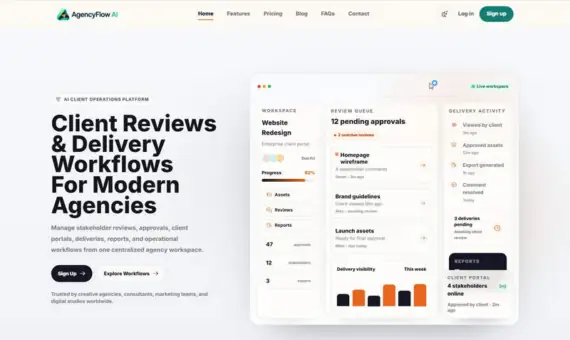
Approval workflow + project management + customer portal: one-stop management of the entire customer delivery process.
In the daily operations of agencies, service companies, consultants, and freelancers, client communication, project delivery, approval feedback, and file sharing are often scattered across emails, chat tools, spreadsheets, and multiple unrelated systems. This fragmented collaboration is not only inefficient but also prone to information omissions, approval delays, and poor customer experience.
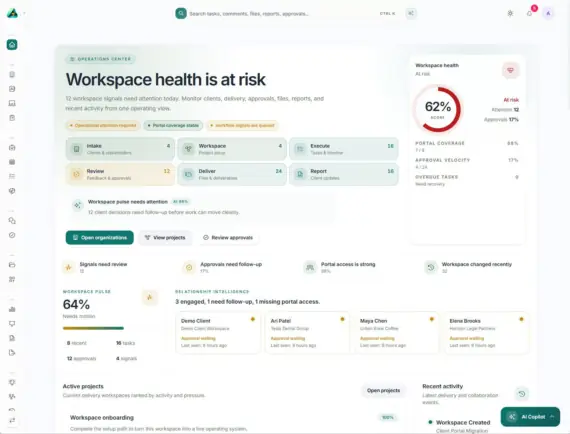
AgentFlow is a modern SaaS platform designed for this purpose. It integrates customer workspaces, stakeholder management, customer portals, project and task management, deliverable approval, asset review, customer requests, file sharing, report export, team collaboration, role and permission management, automated processes, AI assistance, and SaaS package management into a complete customer operations platform.
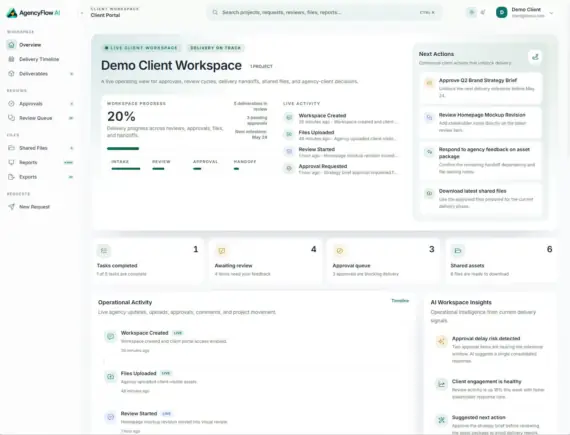
Through AgentFlow, businesses can provide customers with a professional collaboration portal: customers can submit requests, review work results, approve deliverables, download files, track project progress, and access reports—without relying on fragmented emails, chat messages, or spreadsheets.
1. Detailed Explanation of Core Functional Modules
1. Client Workspaces
Each client has their own independent workspace, serving as a central hub for projects, stakeholders, portals, approvals, deliverables, documents, requests, and reports.
| Function Description | |
| Multi-client workspace | Creating and managing multiple client workspaces |
| Customer Information Management | Store customer name, industry, email, phone number, website, and time zone. |
| Workspace Status Tracking | Track delivery health status and workspace status |
| Stakeholder Management | Managing customer contacts and approval decision-makers |
| Project Activity View | View project progress and activity history |
| Portal status monitoring | Monitor customer portal settings status |
| Organizational reports | Access to organizational-level reports and summary data |
2. Stakeholders & Client Contacts
Manage reviewers, approvers, decision-makers, and customer contacts from a unified, structured directory.
| Function Description | |
| Stakeholder Records | Add stakeholder and customer contact records |
| Roles and permissions allocation | Assign roles, permissions, and workspace access |
| Access Control | Control approval, commenting, uploading, and downloading permissions |
| Email Invitation | Invite stakeholders via email |
| Passwordless access | Supports access via Magic Link. |
| Activity tracking | Tracking stakeholder activities and engagement |
3. Client Portal
The client-facing portal allows stakeholders to access project updates, submit requests, review work, approve deliverables, download documents, and read reports.
| Function Description | |
| Customer portal login | Dedicated Client Login Portal |
| Invitation Acceptance Process | Stakeholders accept invitations and set passwords |
| Workspace Overview | View overall workspace status |
| Delivery Timeline | View project delivery timelines |
| Client Request Submission | Clients can submit various work requests |
| Approval Queue | View pending approvals in one place |
| Asset Review Workspace | Review creative assets and provide feedback |
| Shared File Library | Browse and download shared files |
| Client Reports | View deliverables and reports |
4.Projects & Tasks
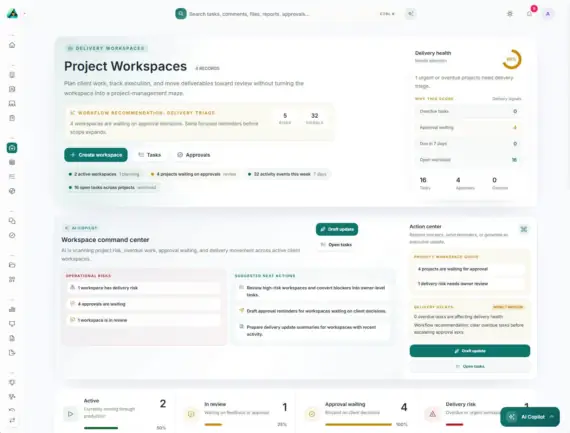
Create projects and tasks, and manage customer deliveries, internal execution, customer-visible progress, timelines, milestones, deliverables, and approvals.
| Function Description | |
| Project Creation | Create a project for the client. |
| Status and Priority | Set status, priority, start date, and end date. |
| Task Assignment | Assign tasks to team members. |
| Progress Tracking | Track project and task progress. |
| Workflow Association | Associate tasks with delivery workflows. |
| Client-Seen Progress | Show the client the project progress. |
| Activity History | Maintain the project activity history. |
5. Deliverables
The management team prepares work deliverables for clients, including design drafts, event assets, reports, documents, and final delivery packages.
| Feature Description | |
| Deliverable Creation | Create deliverables for client projects |
| Status Tracking | Track deliverable and review status |
| Version Management | Add version tags and deadlines |
| Document Attachments | Attach documents and assets |
| Review Association | Associate deliverables with reviews and approvals |
| Downloadable Deliverable Packages | Provide downloadable deliverable documents |
6. Approval Workflow
Collecting customer decisions in a structured approval queue enables teams to move forward without losing approval history.
| Function Description | |
| Approval Request Creation | Create an approval request |
| Approve deliverables | Customer can directly approve |
| Approve with notes | Add notes during approval |
| Request modification | Customer can request modifications |
| Reject or partially approve | Support rejection or partial approval |
| Due date tracking | Track approval deadlines and notes |
| Association management | Associate approvals with projects and deliverables |
7. Asset Reviews
Share creative assets with clients and gather feedback in a structured review workspace.
| Function Description | |
| Review Item Creation | Create asset review items |
| Customer Comment Collection | Collect customer comments and replies |
| Review Status Tracking | Track review status |
| Feedback Thread Management | Manage feedback discussion threads |
| Approval Association | Associate reviews with approvals and deliverables |
| History | Keep review history organized |
8.Client Requests
Encourage customers to submit requests in a structured manner, rather than sending fragmented messages in email, chat, or social applications.
| Feature Description | |
| General Requests | Submit general work requests |
| Modification Requests | Submit revision requests |
| Activity/Asset Requests | Submit activity or asset-related requests |
| Priority and Deadlines | Add priority, details, and deadlines |
| Project Association | Associate requests with projects |
| Status Tracking | Track request status and response history |
9. Shared Files
A centralized document repository where customers can browse, preview, and download shared assets.
| Feature Description | |
| Customer-Visible File Library | A file library directly accessible to customers. |
| Multi-Format Support | Supports images, documents, videos, archives, etc. |
| File Preview | File preview and type icons. |
| Metadata Association | Associates project and deliverable metadata. |
| Version Tags | File version identifier. |
| Download Operation | Supports file downloads. |
10. Reports & Exports
Share customer-readable reports for progress updates, delivery summaries, activity insights, approval contexts, and high-level communications.
| Report Type Descriptions | |
| Progress Report | Project Progress Update Report |
| Activity Report | Marketing Activity Report |
| Approval Summary | Approval History Summary |
| Deliverables Report | Deliverables Summary Report |
| PDF Export | Export PDF Format Report |
| ZIP Delivery Package | Package Download Deliverables |
| Workspace Snapshot | Export Overall Workspace Snapshot |
11.AI Operations
Use AI-assisted operational tools to summarize activities, detect blockages, generate updates, and support customer delivery workflows.
| AI Capabilities Description | |
| AI Operations Summary | Automatically generates operational activity summaries |
| Suggests next steps | Intelligently recommends follow-up actions |
| Customer Update Assistance | Assists in generating customer update content |
| Report Generation Support | Assists in generating various reports |
| Approval Delay Signals | Detects and signals approval delays |
| Stakeholder Risk Signals | Identifies stakeholder engagement risks |
| Workplace Health Insights | Analyzes workplace health |
| Workflow Suggestions | Provides workflow optimization suggestions |
12. Team members, roles and permissions
Manage team access permissions and workspace permissions for more secure collaboration.
| Feature Description | |
| Team Member Management | Add and manage team members |
| Role-Based Access Control | RBAC Permission System |
| Workspace-Level Permissions | Detailed permission control down to the workspace level |
| Project Collaboration Roles | Project-Level Collaboration Roles |
| Administrator/User Permission Separation | Separation of Management and Usage Permissions |
| Customer Portal Permission Control | 精Fine-grained control over customer portal access |
2、Administrator and SaaS Functionality
| Feature Description | |
| User Management | Manage platform users |
| Subscription Package Management | Create and manage subscription plans |
| Feature Access Control | Control feature access by package |
| Package Restriction Control | Set usage limits |
| Billing Management | Manage billing processes |
| Admin Dashboard | Global Data Monitoring |
| Brand and System Settings | Customize brand and system configuration |
| Mail Server Settings | Configure SMTP mail service |
| AI Provider Settings | Configure AI service provider |
| Modal Architecture | Supports modular expansion |
3、Payment gateways, social login and security
Supported payment gateways
| Gateway Description | |
| Manual Payment | Manual payment processing |
| PayPal | Mainstream global payment |
| Stripe | Credit card/debit card payment |
| PayU | Emerging Market Payments |
| Razorpay | Indian market payment |
| Paytm | Indian mobile payments |
| YooMoney | Russian payment |
| CCAvenue | India Integrated Payments |
| 2Checkout | Global multi-currency payments |
| SSLCOMMERZ | Bangladesh payment |
| Paystack | African payments |
| Instamojo | Indian e-commerce payments |
| Flutterwave | African payments |
| iyzico | Turkish payment |
| PayTR | Turkish payment |
Note: The availability of the payment gateway depends on your country, currency, merchant account approval, API credentials, callback URL configuration, and the rules of each payment provider.
Social login
| Login Method Instructions | |
| Google Login | |
| Facebook Login | |
| X Login |
Security and Account Protection
| Security Features Description | |
| Email Verification | Registered Email Verification |
| Captcha Protection | CAPTCHA Anti-Bot |
| Two-Factor Authentication (2FA) | Enhanced Security with Two-Factor Authentication |
| Password Reset Process | Standard Password Recovery |
| Administrator Control of Registration Rules | Public Registration Can Be Switched On/Off |
| RBAC Access Control | Role-Based Access Control |
| Customer Portal Authentication | Standalone Portal Authentication |
| Stakeholder Invitation Acceptance Process | Secure Invitation Mechanism |
4. Which industries or enterprises is it suitable for?
| Target Audience | |
| Creative agencies | Manage deliverables and client approvals for design, advertising, and branding projects. |
| Marketing agencies | Handling marketing campaigns, assets, reports, and customer reviews |
| Web Design and Development Studio | Managing customer feedback, test deliverables, and project milestones |
| Social media management agencies | Share reports and creative assets to obtain client approval. |
| Brand Design Studio | Management review and delivery workflow |
| Consulting and service companies | Managing client workspaces and project delivery |
| freelancers | Provide customers with a professional collaboration portal |
| SaaS entrepreneurs | Building and selling workflow and customer management software |
| Enterprise Customer Delivery Team | Centralized management of internal customer project delivery |
5. Examples of Typical Business Scenarios
- Scenario 1 (Creative Agency):A brand design company uses FlowCRM AI to manage 20+ client projects. Clients log in to the portal to review logo design proposals, add comments in the asset review workspace, and designers revise based on feedback before submitting a new version, which the client approves with a single click. All approval history is automatically saved, avoiding confusion from email tracking.
- Scenario 2 (Marketing Agency):A social media management agency generates monthly operational reports for its clients. Through FlowCRM AI, clients can log in to the portal at any time to view the latest reports, download data packages, and submit content requests for the following month. AI-assisted operational summaries help the team quickly identify client accounts that require attention.
- Scenario 3 (SaaS Entrepreneurs):An entrepreneur wants to build a SaaS platform for project delivery in a vertical industry. A SaaS-ready architecture based on FlowCRM AI (user management, subscription packages, payment gateway, access control) can quickly launch an MVP and begin customer acquisition.
6. Summary of Core Advantages
| Advantages | |
| Integrated Customer Operations | Centralized management of the entire process of clients, projects, approvals, documents, and reports. |
| Professional Customer Portal | Provide customers with transparent collaboration and delivery visibility. |
| Structured approval workflow | Say goodbye to fragmented email and chat approval processes. |
| AI-assisted operations | Summary generation, blockage detection, and health insights improve efficiency. |
| Multi-payment gateway | Supports 15+ payment gateways, adaptable to global markets. |
| Enterprise-level security | 2FA, Email Verification, RBAC, Captcha |
| SaaS ready | Users, plans, limits, and billing are all available out of the box. |
| Multilingual and RTL-ready | Support international deployment |
| Dark mode | Modern UI experience |
| Custom domain name support | Supports brand domains based on configuration. |
7. Demonstration and Experience
You can experience the full features at the following demo address before purchasing:
| Entry address Username Password | |||
| Administrator backend | https://demo.stackposts.com/flowcrmai | demo | 123456789 |
| Customer Portal | https://demo.stackposts.com/flowcrmai/client/login | [email protected] | 123456789 |
Note: Demo data may be reset periodically.
8. Server Environment Requirements
| Requirements | |
| PHP version | Please confirm compatibility with the latest documentation. |
| Database | MySQL or MariaDB |
| PHP extension | All required extensions need to be enabled |
| Directory permissions | The storage, cache, and upload directories are writable. |
| Scheduled tasks | Cron job access (for scheduling tasks) |
| Queue system | Queue Worker supports (background task processing) |
| SSL Certificate | Recommended configuration for production environment |
| SMTP mail server | Used for transactional emails and portal invitations |
| Public callback URL | Payment gateways and social logins are required |